Copying numbers out of a PDF and retyping them into a spreadsheet is slow and invites mistakes. If your PDF contains tables, invoices, reports or any kind of tabular data, our free PDF to Excel Converter extracts that data straight into an editable .xlsx file, keeping rows and columns intact so you can start working with it right away.
How to Convert a PDF to Excel
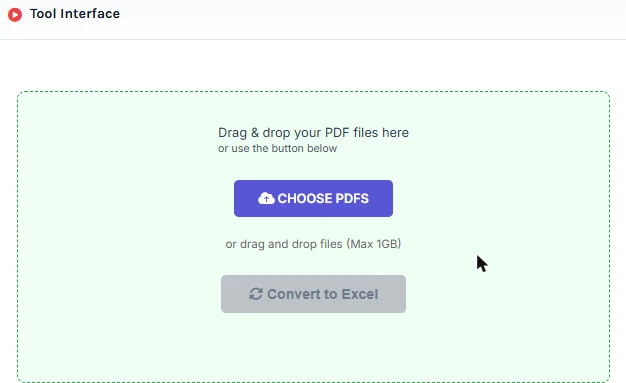
- Open the PDF to Excel Converter.
- Click Choose PDFs and select the PDF file you want to convert.
- Click Convert to Excel and let the tool extract the tables and data from your file.
- Download the resulting .xlsx file once conversion finishes.
- Open it in Excel, Google Sheets, or any spreadsheet app — the data is ready to edit, sort or recalculate.
Why Convert a PDF to Excel?
PDFs are built for sharing and printing, not for analysis. Once a table lands in a PDF, you can’t sort it, filter it, or run formulas on it. Converting to Excel turns static numbers back into live data — useful for financial reports, invoices, price lists, survey results, or any document where someone downstream needs to crunch the numbers rather than just read them.
Will the Formatting Stay Accurate?
The tool does its best to preserve the original table structure — rows, columns and cell values — so the output closely matches what you see in the PDF. Very complex layouts (merged cells, scanned images of tables, or multi-column text mixed with data) may need a little manual tidying afterward, but straightforward tables convert cleanly.
Is My Data Safe?
Yes. Your file is processed securely for the conversion and isn’t kept afterward, so sensitive spreadsheets and reports stay private.
Frequently Asked Questions
Does this work with scanned PDFs?
It works best with PDFs that contain real text and tables rather than scanned images. A scanned document may need OCR first before its tables can be extracted accurately.
Can I convert multiple PDFs at once?
The Choose PDFs button lets you select the files you need to convert for each session, making it easy to process one document after another.
Is this PDF to Excel converter free?
Yes, converting your PDF to an Excel spreadsheet with this tool is completely free.
Related PDF Conversion Tools
- PDF to Excel Converter — turn PDF tables into an editable spreadsheet.
- Convert PDF to Word — turn a PDF into an editable Word document.